Start with two model numbers, not one product family
This is a documentation comparison, not a hands-on review or a claim that either product is best. The Plus manual identifies JE-2000C. The US section of the v2 manual identifies JE-2000D, even though its cover shortens the name to Explorer 2000. Jackery's v2 support page confirms that mapping. Regional versions and similarly named newer families are outside this comparison.
Before comparing bundles, ask for a photograph of the station's model label and write the region next to it. Then make three separate shopping lines: the station, any extra battery, and any connector or solar accessory. A seller's bundle name can hide which component is included. Save the exact listing and accessory SKU with the matching manual; a vague promise that something works with 'the 2000 series' is not enough to order an expensive battery.[1][2][4]
Extra stored energy and a second station are different connections
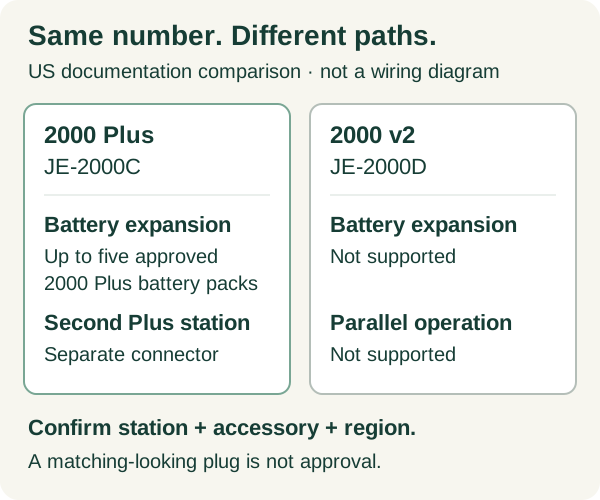
The Plus has a DC expansion connection for its battery-pack system and a separate AC expansion connection for another Explorer 2000 Plus. Its manual permits up to five Battery Pack 2000 Plus units and directs owners to that pack's manual. Linking two stations uses the separately sold Jackery Connector and its own instructions. Those are two different purchases and connection paths.
Jackery's official comparison says the v2 supports neither expansion batteries nor parallel operation. Do not treat ordinary charging from another device as equivalent to a manufacturer-supported expansion system. Nor should an adapter be assumed to add a feature absent from the station. Ask support to confirm the complete proposed chain in writing if a listing mixes 'Plus,' 'v2' and 'Pro' terminology.[1][3]
A useful accessory question names every part
Use a short request such as: 'I own US JE-2000C. Please confirm the current approved expansion-battery model, connection cable, quantity limit and instructions for this serial number.' For a two-station installation, add both station labels and the connector SKU. For solar, list the panel model, quantity and proposed arrangement separately. This is an editorial purchasing worksheet, not an instruction to assemble a system from a generic diagram.
Keep unanswered cells marked unknown. A manufacturer confirmation for a battery does not automatically confirm a solar adapter, and a cable supplied in one regional bundle may not be supplied in another. Include the price of required accessories in the quote only after the compatibility question is settled. A cheaper incomplete bundle is not yet a cheaper working system.
The headline wattage is not the limit in every operating mode
The US manuals list 3000 W maximum total AC output for the Plus and 2200 W rated total AC output for the v2. These are power ratings, not energy capacities or runtime promises. Crucially, the v2 instructions describe a 1500 W output limit before an outage while operating in bypass, returning to 2200 W on battery during the outage. Do not size a continuously connected load solely from the larger number on the box.
Both manuals describe a transfer within 20 ms, not zero-interruption operation, and require compatibility checking. A successful test with a lamp cannot establish suitability for a device that resets during a brief supply interruption. Do not use this comparison to approve life-support equipment or another load whose interruption would create harm. Seek that equipment manufacturer's specific backup requirements.[1][2]
| Question | Explorer 2000 Plus | Explorer 2000 v2 |
|---|---|---|
| Model / region | JE-2000C / US manual JAK-UM-V1.0 | JE-2000D / US English manual section |
| Additional batteries | Up to five Battery Pack 2000 Plus units; use pack instructions | No expansion-battery support in the official comparison |
| Second station | Dedicated Jackery Connector, sold separately; its manual governs | No parallel-operation support in the official comparison |
| Total AC output / bypass | 3000 W maximum AC output; bypass input/output separately specified as 120 V, 60 Hz, 12 A Max (manual p. 1) | 2200 W rated on battery; 1500 W described in pre-outage bypass |
| Automatic transfer | Within 20 ms; not 0 ms | Within 20 ms; not 0 ms |
| What this table cannot prove | Actual load compatibility or installation suitability | Actual load compatibility or required runtime |
Scroll sideways to read every column on smaller screens.
Separate the load test from the runtime estimate
Our proposed acceptance record has four columns: appliance model, required continuous and starting power, observed behavior during an allowed transfer test, and measured energy over a representative period. Record the station's initial charge, enabled operating mode and connected accessories. Leave a result unverified if you have not performed the check; do not turn a manufacturer maximum into a measured result.
For a cycling refrigerator, inspect low-load shutdown settings as a separate issue from starting power. The existing refrigerator-shutoff guide walks through that diagnosis. For runtime planning, use the load checklist and retain conversion losses and reserve as explicit assumptions. This article deliberately supplies no 'runs your refrigerator for two days' estimate: the appliance, conditions and usable energy have not been measured.
A shared app does not mean shared solar or expansion limits
Jackery lists both products as app-compatible. That is a control feature, not evidence that their ports, battery packs or panel configurations are interchangeable. The v2 support page specifies model-dependent panel combinations and input limits. Use that exact configuration documentation, not a photograph of a connector, when confirming a solar bundle.
Before checkout, request the component list and an explanation of what is required but absent: panel cables, permitted adapters, expansion connectors and any installation work. Keep a second list for operational needs such as clear access, storage space and who can move the unit. A paper comparison should reveal those missing decisions instead of hiding them under a single capacity number.[5][4]
Choose an architecture; do not buy a promise of whole-home backup
The Plus is the relevant candidate when a documented future expansion path is a requirement. The v2 is a separate single-station candidate when expansion is unnecessary and the intended load fits all relevant operating limits. Neither conclusion establishes that a particular home, circuit or appliance is compatible. Compare the complete system against your written requirements before considering a retailer offer.
This page does not authorize connecting either unit to household wiring. Circuit integration needs the appropriate equipment and qualified assessment; consult the transfer-switch guide for that separate decision. We have not verified current prices, accessory stock, regional warranty entitlement or every serial-number revision. Resolve those at purchase, and keep the dated answer with the manuals.[3]
Related reading and tools
Choose the next step for your situation: measure, compare options, or maintain and verify.
- Measure the problemSolar Generator for Refrigerator Backup: Size Watts and Runtime
- Measure the problemHome Backup Power Load Checklist: Build a Critical-Loads Inventory
- Compare your optionsGenerator Transfer Switch vs Extension Cords: Safe Power Paths
- Maintain and verifyPortable Power Station Refrigerator Shuts Off: A Troubleshooting Guide
How this guide was checked 2026-10-23T00:00:00.000Z
Guides are built from official sources, product documentation, manufacturer manuals, and practical homeowner decision criteria. We do not claim hands-on product testing unless a page explicitly says a product was tested.
- Source-backed editorial review
- 5 cited source records
- Follow device manuals and carbon-monoxide safety guidance. Generators must stay outdoors and away from openings; medical-device users should confirm backup plans with providers.
Ready Home Systems is educational and not a substitute for local code officials, licensed trades, medical providers, water labs, or mitigation professionals.
Read review methodologySources and manuals
- Explorer 2000 Plus US user manual: JE-2000C, JAK-UM-V1.0Jackery
- Explorer 2000 v2 user manual: JE-2000D, US English sectionJackery
- Differences among Explorer 2000 V2, 2000 Plus and 2000 ProJackery
- Explorer 2000 V2 Basic InformationJackery
- Compatible Products with the APPJackery
Keep a copy for reference or share the guide. Check the online version for later updates.
Ready Home Systems · https://readyhomesystems.com/jackery-explorer-2000-plus-vs-v2/
Planning guidance, not a professional assessment. Check the online guide and cited sources for updates.