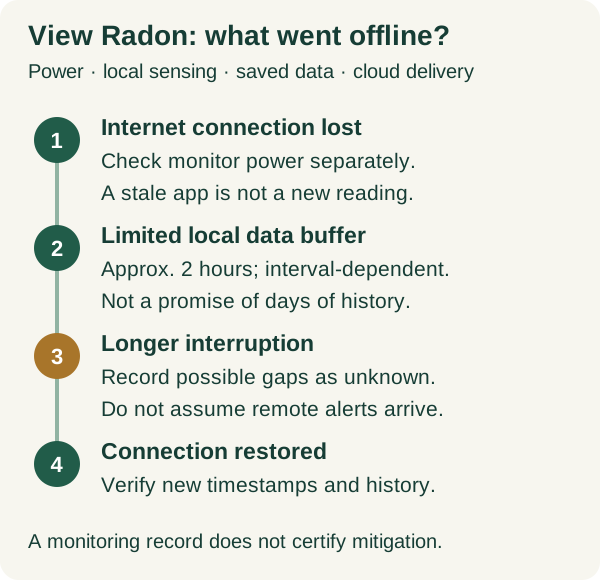
First identify what stopped updating
An app's old timestamp can mean the home monitor cannot reach the cloud; it does not by itself prove that sensing has stopped. Conversely, a visible value is not evidence of a fresh upload. Treat monitor power, sensor operation, local display, saved history and delivery to your phone as separate questions. This guide uses the US Airthings View Radon, model 2989, as its documented example—not every product with 'radon monitor' in its name.
Write down what you actually observe: the local display, the last app timestamp, whether the household has power, and whether another device can use the same internet connection. Avoid changing several settings immediately. An unedited screenshot and a short incident timeline are more useful to support than a guess that 'the sensor failed' after a router restart.[4][1]
Check the monitor's power separately from the router's power
The View Radon product sheet specifies six AA batteries or USB power and says it can run from its batteries when USB is removed. That requires usable batteries to be present; a USB cable alone is not a backup battery. Inspect the supported power arrangement and battery condition using the device instructions. Do not move the monitor to a different room merely to reach a socket if you need a comparable record of its original location.
A functioning monitor does not keep a router, modem or upstream internet service running. In an outage, all may have different power dependencies. Make a small inventory with one line for each device rather than labelling the entire system 'battery backed up.' An internet connection working on your phone's mobile data also does not establish that the home's Wi-Fi connection is working.[4]
Sampling, screen refresh and cloud sync have different clocks
Airthings' View guidance separates sensor sampling from cloud synchronization. It describes hourly radon sampling, while upload intervals depend on power and settings. It also says the View screen updates independently of the cloud connection. Consequently, a screen can be more current than the app while internet access is interrupted; neither should be treated as an instantaneous detector of every change in room air.
When reporting a discrepancy, label both observations with their timestamps and units. 'Screen at 10:15; app last synchronized at 08:40' describes two records without assuming they represent the same averaging window. If the interface does not expose the information needed to interpret the number, ask support rather than inferring a new measurement from a changed screen or a successful app login.[3]
Do not plan on recovering a day's missing graph
Airthings' View-series storage note says approximately two hours of sensor data can be held locally without internet, with variation by sampling interval. Treat that as a limited buffer, not an archive guarantee or a precise countdown. The document does not justify promising that a full overnight outage will be reconstructed after reconnection. A longer interruption should be recorded as a possible history gap.
For example, suppose the internet fails at 1 a.m. and returns at 9 a.m. while the monitor remains powered. This is a hypothetical incident, not our test result. Save the known start and restoration times, then inspect what the app actually contains after synchronization. Mark unobserved intervals as unknown. Do not draw an invented line across missing values or use the last pre-outage value to claim that radon stayed unchanged.[1]
| Observed state | What may remain available | Do not assume |
|---|---|---|
| Internet fails; monitor has supported power | Local sensing/display; limited local storage | Fresh cloud data or immediate remote alerts |
| USB is lost; usable batteries are installed | Battery operation described for View Radon | USB-dependent hub functionality continues |
| Outage exceeds the approximate two-hour buffer | Whatever observations were actually retained | Complete history will later reappear |
| All supported monitor power is absent | Previously retained/displayed information only | New measurements were being taken |
| Network reconnects | New uploads can be checked by timestamp | Every missing interval or alert was recovered |
Scroll sideways to read every column on smaller screens.
Keeping View alive does not preserve every connected feature
View's hub function for compatible Wave monitors requires USB power. The manufacturer distinguishes this from operation on batteries. If a View device falls back to battery during an outage, do not assume that linked Wave devices still have their usual cloud path. Check each model's connectivity instructions; the View-series local-storage statement is not evidence for a Wave product's storage behavior.
Remote alerts depend on a current information path. As an operational inference, if new sensor data cannot reach the cloud, do not rely on phone notifications to report that unseen data in real time. Notification settings and app permissions need their own check after connectivity returns. A silent phone is not a radon result, and this article makes no promise about delayed alerts or automatic backfilling.[3][1]
Restore connectivity, then verify the record rather than just the icon
Airthings' troubleshooting guidance asks owners to verify power and an enabled 2.4 GHz Wi-Fi network. Begin with those observations and the current manufacturer instructions. This page does not recommend weakening network security or opening inbound ports. If the connection repeatedly fails, send support the router model, use of mesh or extenders, power arrangement and failure timeline.
After restoration, confirm a new app timestamp, record any visible gaps and retain screenshots with the incident notes. Our suggested log is deliberately modest: known outage start; monitor power source; local observation time; restored connectivity time; latest cloud timestamp; unresolved intervals. For a formal test or property transaction, disclose the interruption to the responsible testing provider and follow its protocol. Do not silently replace a required test with a convenient app average.[2]
The mitigation fan still needs its own check
A radon monitor measures; it does not operate or certify the mitigation system. EPA recommends regular checks of the system warning device and a radon retest at least every two years. Use the installer instructions when a warning appears or power has been interrupted. The manometer guide explains why a pipe-pressure indication and a room-air radon reading cannot substitute for one another.
Keep the monitoring incident, any mitigation service and subsequent testing as separate records. If a result requires professional follow-up, a restored Wi-Fi icon does not resolve it. The practical outcome of this checklist is a truthful account of what was measured, what was merely displayed and what remains unknown—not a declaration that a home is safe.[5]
Related reading and tools
Choose the next step for your situation: measure, compare options, or maintain and verify.
- Measure the problemDigital Radon Detector vs Charcoal Kit: Which Test Should You Use?
- Measure the problemRadon Test Preparation Checklist: Before, During, and After Testing
- Maintain and verifyReading a Radon Manometer: What the U-Tube Can—and Cannot—Tell You
- Maintain and verifyRadon Testing After Mitigation: When and How to Retest
How this guide was checked 2026-10-23T00:00:00.000Z
Guides are built from official sources, product documentation, manufacturer manuals, and practical homeowner decision criteria. We do not claim hands-on product testing unless a page explicitly says a product was tested.
- Source-backed editorial review
- 5 cited source records
- Radon and mold decisions can affect health. Follow EPA/CDC guidance and use qualified mitigation or remediation pros when levels, area, or symptoms justify it.
Ready Home Systems is educational and not a substitute for local code officials, licensed trades, medical providers, water labs, or mitigation professionals.
Read review methodologySources and manuals
- View: local storage after losing Wi-Fi connectivityAirthings
- View: WiFi information and troubleshootingAirthings
- Airthings app: Plug in USB-C to activate HubAirthings
- View Radon US product sheet, model 2989Airthings
- How do I know if my radon mitigation system is working properly?U.S. Environmental Protection Agency
Keep a copy for reference or share the guide. Check the online version for later updates.
Ready Home Systems · https://readyhomesystems.com/radon-monitor-power-wifi-outage/
Planning guidance, not a professional assessment. Check the online guide and cited sources for updates.