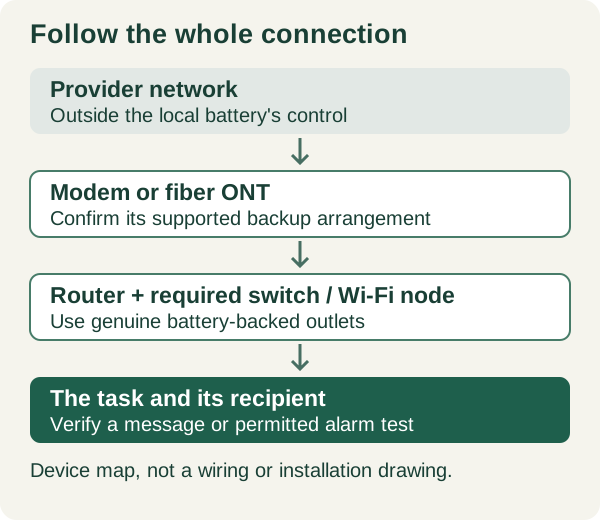
Draw the path from the incoming service to one useful task
Choose a concrete task first: send a message from the kitchen, receive a sump alarm on a phone, or keep one work laptop online. Then trace the devices that task passes through. A combined cable gateway may perform two jobs in one box; a fiber installation may have an ONT in a utility area and a separate router upstairs. An Ethernet switch or a mesh node can be a dependency even when it was not sold as the internet router.
Our worksheet treats each powered box as its own line. Record its location, exact model, original power adapter, what connects to it and whether the chosen task needs it. Exclude optional equipment deliberately rather than unplugging unidentified boxes. If provider-owned equipment has a hardwired supply, inaccessible enclosure or unclear backup connector, ask the provider for the supported arrangement; this guide is not permission to alter it.
Verizon's PowerReserve is a useful example of why the label battery backup is insufficient: its support guidance limits that device to voice service, not Fios internet, TV or peripheral equipment. That statement applies to PowerReserve, not every ONT or backup product. Ask which service the exact installed unit preserves. A battery indicator beside the fiber entry point does not answer that question.[4]
Count backed-up outlets, not the sockets on the case
The US APC BE600M1 is a documented example, not our test winner. Schneider specifies 600 VA / 330 W and seven outlets, of which two are surge-only; five provide battery backup. The original manual distinguishes the two outlet groups. Equipment on a surge-only socket loses its supply during an outage even if the UPS battery is charged. Read the markings on the actual unit rather than copying a generic UPS photograph.
Make an outlet map beside the device list: ONT adapter → battery socket; router adapter → battery socket; optional printer → not part of the backup task. Large adapters can obstruct adjacent sockets, so physical fit matters as well as count. Record a blocked socket as unavailable. Do not solve the problem by stacking adapters or attaching an unapproved extension arrangement.[1][2]
Keep the adapter and power-distribution rules with the plan
Schneider advises plugging the UPS directly into a wall receptacle and recommends against surge strips, power strips or extension cords on its output. Consult the exact UPS documentation for an approved distribution option when needed. These are manufacturer instructions, not a claim that this article has inspected your wiring or approved an installation.
For this AC-backup worksheet, retain the network equipment's approved AC adapters. A USB charging socket is not evidence that a USB-to-barrel cable has the right voltage, polarity, connector or power behavior for a router. Direct-DC backup is a separate compatibility project. If a socket shows damage, grounding is uncertain or the UPS reports a wiring fault, stop and obtain qualified help instead of defeating the grounding connection.[3][2]
Turn a target duration into a load question
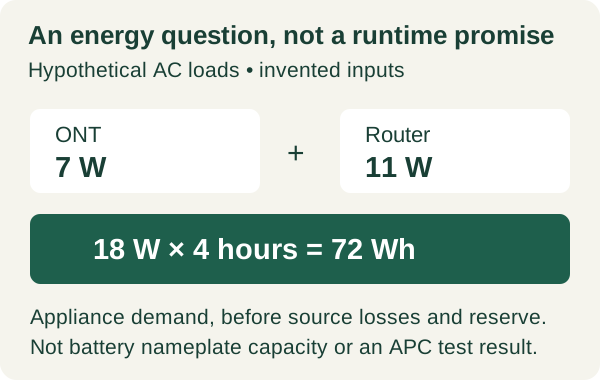
Watts describe the present load; watt-hours describe energy used over time. Neither a 600 VA label nor a 330 W output rating means 330 Wh of stored usable energy. The manufacturer's runtime tool is model- and load-specific. We located the official BE600M1 runtime interface but did not obtain a reliable numerical low-load reading from it, so this article does not assign that UPS a number of router-hours.
Hypothetical planning example: an ONT averages 7 W and a router averages 11 W at their AC adapters. The combined 18 W load needs 72 Wh over four hours at that measurement boundary. Those invented inputs illustrate the arithmetic only; 72 Wh is not the required battery nameplate capacity and does not prove that any particular UPS lasts four hours. Conversion losses, the UPS's own consumption, battery age and operating conditions still matter.
If a suitable, properly rated meter can be used as permitted by the equipment instructions, record measured demand during representative use rather than treating the adapter's maximum rating as its normal consumption. Keep the adapter and meter boundary in the notes. Add a planned stop point and an alternative way to communicate before comparing documented runtime with the household's target.[1][5]
Use one sheet for the equipment and the observed result
The table is an original planning aid; blanks are intentional. Fill the first three columns before testing and the last column afterward. Keep target duration and observed duration in different fields. A five-minute demonstration may establish that the devices stay connected through a transition, but it cannot establish overnight endurance.
Include the device that receives the information. An online sump sensor is not a completed alert path unless a recipient actually receives and notices a permitted test message. Likewise, a laptop's browser loading a saved page can conceal an internet failure. Use a normal external service or permitted manufacturer test, document what worked, and avoid collecting passwords, account tokens or private alarm details in a shared worksheet.[4][2]
| Dependency | Record before the test | Backup arrangement | Record after the test |
|---|---|---|---|
| Internet entry | ONT/modem model, location and provider | Approved adapter and battery socket | Power remains? Internet available? |
| Router / essential node | Model, adapter and task served | Battery socket; physical adapter clearance | Wi-Fi remains? Any reboot? |
| Switch / other required link | Why the selected task needs it | Documented power path | Task still reaches its destination? |
| Whole supported load | Measured watts or clearly marked unknown | Target hours; official load/runtime evidence | Duration observed; stop condition; battery state |
| Recipient / fallback | Named response and alternative connection | Separate phone power / service plan | Permitted test received; normal state restored |
Scroll sideways to read every column on smaller screens.
Test the task, restore normal operation, then keep a fallback
Follow the UPS and connected-device instructions for an approved battery test; do not improvise a mains-disconnection method from a diagram. Check separately whether each device remains powered, whether local Wi-Fi remains reachable, whether internet communication works and whether the intended alert or message reaches its recipient. Write down the test conditions, starting battery indication and any reboot or failure. Restore the normal setup and charging state afterward.
Keep a simple response decision beside the record: if internet service fails while local equipment remains on, move to the prepared alternative instead of buying a larger battery on that evidence alone. A local UPS controls only part of the chain. Provider equipment, the regional network, remote servers and the receiving phone are outside the UPS's guarantee. For medical or emergency communications, obtain the service provider's continuity guidance rather than making this small-network worksheet the sole plan.[2][4]
Related reading and tools
Choose the next step for your situation: measure, compare options, or maintain and verify.
- Measure the problemHome Backup Power Load Checklist: Build a Critical-Loads Inventory
- Measure the problemHow to Estimate Portable Power Station Runtime Conservatively
- Maintain and verifySump Pump High-Water Alarm: Local, Wi-Fi, or Cellular?
- Maintain and verifyHurricane Power Outage Checklist: Before, During, and After
How this guide was checked 2026-10-23T00:00:00.000Z
Guides are built from official sources, product documentation, manufacturer manuals, and practical homeowner decision criteria. We do not claim hands-on product testing unless a page explicitly says a product was tested.
- Source-backed editorial review
- 5 cited source records
- Follow device manuals and carbon-monoxide safety guidance. Generators must stay outdoors and away from openings; medical-device users should confirm backup plans with providers.
Ready Home Systems is educational and not a substitute for local code officials, licensed trades, medical providers, water labs, or mitigation professionals.
Read review methodologySources and manuals
- BE600M1 US product specificationsSchneider Electric
- Back-UPS BE600M1 original user manual, 990-5679 (09/2015)Schneider Electric / APC
- Using surge strips with APC Back-UPS and Smart-UPSSchneider Electric
- Fios Digital Voice PowerReserveVerizon
- BE600M1 official runtime interfaceSchneider Electric
Keep a copy for reference or share the guide. Check the online version for later updates.
Ready Home Systems · https://readyhomesystems.com/router-modem-battery-backup/
Planning guidance, not a professional assessment. Check the online guide and cited sources for updates.